


公司最近要重启小程序相关的功能,因为之前的代码太烂,所以干脆重开了新项目,正好借此机会记录下在重写项目中遇到的坑。
坑一:新建项目时的依赖相关
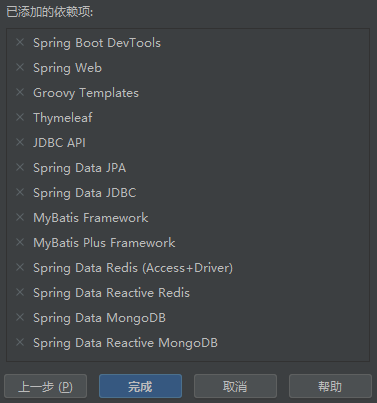
因为首次接触这种企业级项目,不知道都要啥依赖,问了组长说是用项目模板,但此时的我完全不知道这是个什么玩意,所以组长干脆让我自由发挥,项目能跑就行(经典人和项目有一个能跑就行hhh),然后我就把这些直接要看着眼熟的依赖全都引了进来,能跑就行(
====================================================================
千万不要乱引依赖!!!!
被折磨了数个小时的我回来补充,依赖这玩意宁缺毋滥,少的依赖你可以后面再补!!
坑二:项目启动相关
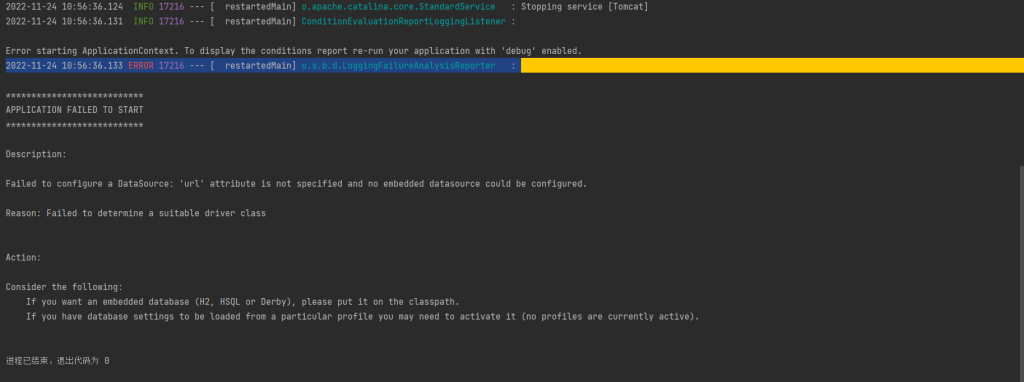
项目首次启动时可能会报这个错误,原因有很多,我遇到的是因为没有连接到数据库,当然首次启动项目或许只是想跑个hello world测试下接口是否正常,所以可以通过修改Application内的注解进行不连接数据库的项目启动
//原代码,如果项目需要连接数据库记得改回来!!!
@SpringBootApplication
public class QcServerApplication {

    public static void main(String[] args) {
        SpringApplication.run(QcServerApplication.class, args);
    }

}

//修改为
@SpringBootApplication(exclude= {DataSourceAutoConfiguration.class})
public class QcServerApplication {

    public static void main(String[] args) {
        SpringApplication.run(QcServerApplication.class, args);
    }

}
坑三:Dao层映射
启动类上要加MapperScan注解以扫描dao包,不然dao层接口无法找到
@SpringBootApplication
@MapperScan("com.example.qcserver.dao")
public class QcServerApplication {

    public static void main(String[] args) {
        SpringApplication.run(QcServerApplication.class, args);
    }

}
首次为Dao添加xml映射时,可能会报错
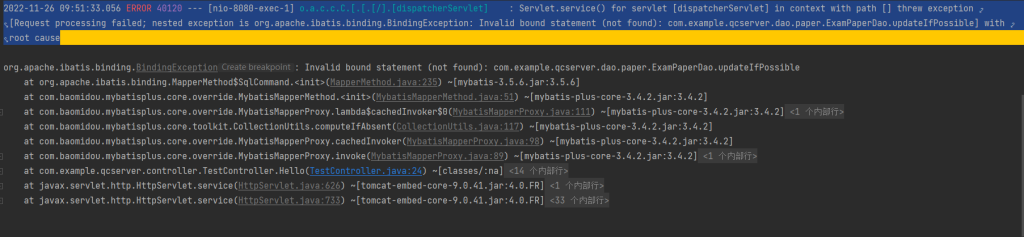
检查target发现dao的xml映射并没有被编译成功,需要在pom.xml里添加配置
<resources>
            <resource>
                <directory>src/main/java</directory><!---设置编译的包-->
                <includes>
                    <include>**/*.xml</include><!---该路径下的.xml类型文件也要编译-->
                    <include>**/*.properties</include><!---该路径下的.properties类型文件也要编译-->
                </includes>
                <filtering>false</filtering>
            </resource>
            <resource>
                <directory>src/main/resources</directory><!---设置编译的包-->
                <includes>
                    <include>**/*.*</include><!---该路径下的.xml类型文件也要编译-->
                </includes>
                <filtering>false</filtering>
            </resource>
        </resources>
然后就是xml编写时的注入bean注入问题,参数一定要添加路径
<update id="updateIfPossible" parameterType="com.example.qcserver.entity.paper.ExamPaper">
        update exam_paper
        <set>
            <if test="paperId != null">paper_id = #{paperId},</if>
            <if test="paperName != null">paper_name = #{paperName},</if>
            <if test="subject != null">subject = #{subject},</if>
            <if test="grade != null">grade = #{grade},</if>
            <if test="semester != null">semester = #{semester},</if>
            <if test="timeAllowed != null">time_allowed = #{timeAllowed},</if>
            <if test="marks != null">marks = #{marks},</if>
            <if test="regionId != null">region_id = #{regionId},</if>
            <if test="year != null">year = #{year},</if>
            <if test="testPeople != null">test_people = #{testPeople}</if>
        </set>
        where id = #{id}
    </update>
坑四:SpringBoot接口传参
简单传参在前后端分离项目中很显然不适用,一般选择使用map传参或者构造实体类来接受参数,这里要注意使用@RequestBody注解
    @RequestMapping(value = "/add",method = RequestMethod.POST)
    @ResponseBody
    public BaseResponse stuAdd(@RequestBody Map<String,String> data, HttpServletRequest request){
        String username = data.get("username");
        String password = data.get("password");
        return new BaseResponse(200,"访问成功!");
}
坑五:JSON格式中的bool类型解析
最近在开发一个接口中需要在响应类中设计一个Boolean类型的字段isSubmited,也没多想,就直接写了,然后返回值是这样的
{
	"code": 200,
	"msg": "访问成功!",
	"data": {
		"materialList": [
			{
				"materialId": "111",
				"materialName": "测试111",
				"submited": true
			},
			{
				"materialId": "222",
				"materialName": "测试222",
				"submited": true
			}
		],
		"paperList": [
			{
				"paperId": "4028a5b584b1dd500184b1dd50c90000",
				"paperName": "测试",
				"submited": true
			}
		]
	}
}没错,Boolean类型的变量开头的is被删了!,查了很多资料发现是因为我的库中引用了阿里的fastjson!
它的解析机制会删除前面的is,所以开发时要多多注意!
解决方法有两个,一个是在变量名上加上@JSONField( name = value )的注解
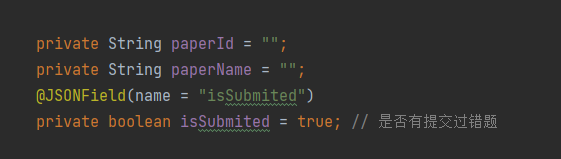
但是我实测效果并不理想,因此我更推荐第二种方法,重写该变量的get和set方法
public class MaterialListResponse {

    private String materialId = "";
    private String materialName = "";
    private boolean submited = true; // 是否有提交过错题

    public String getMaterialId() {
        return materialId;
    }

    public void setMaterialId(String materialId) {
        this.materialId = materialId;
    }

    public String getMaterialName() {
        return materialName;
    }

    public void setMaterialName(String materialName) {
        this.materialName = materialName;
    }

    public boolean getIsSubmited() {
        return submited;
    }

    public void setIsSubmited(boolean submited) {
        this.submited = submited;
    }
}
重写方法之后,即便变量名改成了submited,返回的json依旧是正常的
{
	"code": 200,
	"msg": "访问成功!",
	"data": {
		"materialList": [
			{
				"materialId": "111",
				"materialName": "测试111",
				"isSubmited": true
			},
			{
				"materialId": "222",
				"materialName": "测试222",
				"isSubmited": true
			}
		],
		"paperList": [
			{
				"paperId": "4028a5b584b1dd500184b1dd50c90000",
				"paperName": "测试",
				"isSubmited": true
			}
		]
	}
}
所以说fastjson的解析机制真的很玄幻,开发要多多注意啊!
坑六:jackson的空值判定
在java中对string类型的json反序列化时一般会使用fastjson或者jackson两个依赖,两者对反序列化时null值处理有不同,例如有一个String json = "" ; 如果对其进行反序列化会有不同的结果:fastjson会直接输出一个null值,而jackson会报出一个异常IllegalArgumentException:argument "content" is null;因为项目要尽量简洁,而spring已经把jackson塞进了本体里面,以后肯定要经常和jackson打交道,所以后面还是要记得这些坑啊~~
附上jackson反序列化对象为List<String>类型时的转换代码
        Question question = questionDao.findByQuestionId(questionId);
        ObjectMapper objectMapper = new ObjectMapper();
        if (question.getQuestionTypes() == 7){
            map.put("options",objectMapper.readValue("[\"对\",\"错\"]",new TypeReference<List<String>>(){}));
        }else if(!StringUtils.isBlank(question.getOptions())){
            map.put("options",objectMapper.readValue(question.getOptions(),new TypeReference<List<String>>(){}));
        }
Comments NOTHING