


线程创建
- 继承Thread类(重点)
- 实现Runnable接口(重点)
- 实现Callable接口
继承Thread类
创建线程方式一:继承Thread类,重写run( )方法,调用start( )方法开启线程
注意:线程开启不一定立即执行,由cpu调度执行
public class ThreadTestDemo extends Thread{
    public void run(){
        //子线程体
        for (int i = 0; i < 20; i++) {
            System.out.println("子线程--");
        }
    }
    public static void main(String[] args) {
        //主线程体

        ThreadTestDemo thread = new ThreadTestDemo();
        thread.start();

        for (int i = 0; i < 200; i++) {
            System.out.println("主线程");
        }
    }
}
案例
//使用多线程批量下载网络图片
public class ThreadTestDemo2 extends Thread{
    private String url;
    private String name;

    public ThreadTestDemo2(String url,String name){
        this.url = url;
        this.name = name;
    }

    public void run(){
        webDownloader webDownloader = new webDownloader();
        webDownloader.downloader(this.url,this.name);
        System.out.println("文件 "+this.name+" 下载成功");
    }

    public static void main(String[] args) {

        ThreadTestDemo2 t1 = new ThreadTestDemo2("https://i0.hdslb.com/bfs/archive/2c6b47d111f503cbf27a04b92e29bae3017ba070.jpg@336w_190h_1c.jpg","E:\\JavaTestPath\\1.jpg");
        ThreadTestDemo2 t2 = new ThreadTestDemo2("https://i0.hdslb.com/bfs/archive/e3dadc20ae329e4284ba04e0b259fa252514925c.jpg@336w_190h_1c.jpg","E:\\JavaTestPath\\2.jpg");
        ThreadTestDemo2 t3 = new ThreadTestDemo2("https://i0.hdslb.com/bfs/archive/4096efb9ff4f40d4ee047f5387b3436dec655cd8.jpg@336w_190h_1c.jpg","E:\\JavaTestPath\\3.jpg");

        t1.start();
        t2.start();
        t3.start();
    }

}
class webDownloader{
    public void downloader(String url,String name){
        try {
            FileUtils.copyURLToFile(new URL(url),new File(name));
        } catch (IOException e) {
            e.printStackTrace();
            System.out.println("downloader方法异常");
        }
    }
}
实现Runnable接口
创建线程方式二:实现Runnable接口,重写run( )方法,执行线程需要丢入Runnable接口实现类,调用start( )方法
public class ThreadTestDemo3 implements Runnable{
    public void run(){
        //子线程体
        for (int i = 0; i < 20; i++) {
            System.out.println("子线程--");
        }
    }

    public static void main(String[] args) {
        //创建Runnable接口的实现类对象
        ThreadTestDemo3 threadTestDemo3 = new ThreadTestDemo3();

        //创建线程对象,通过线程对象来开启线程,代理
       /* Thread thread = new Thread(threadTestDemo3);
        thread.start();*/
        new Thread(threadTestDemo3).start();

        for (int i = 0; i < 200; i++) {
            System.out.println("主线程");
        }
    }
}
案例
//多个线程同时操作同一个对象
//买火车票
//问题:多个线程操作同一个资源的情况下,线程不安全,数据紊乱
public class ThreadTestDemo4 implements Runnable{

    private int tiketNums = 10;

    public void run(){
        while (tiketNums>0){
            try {
                Thread.sleep(200);
            } catch (InterruptedException e) {
                e.printStackTrace();
            }
            System.out.println(Thread.currentThread().getName()+"---->拿到了第"+tiketNums--+"票");
        }
    }

    public static void main(String[] args) {
        ThreadTestDemo4 threadTestDemo4 = new ThreadTestDemo4();

        new Thread(threadTestDemo4,"小明").start();
        new Thread(threadTestDemo4,"老师").start();
        new Thread(threadTestDemo4,"黄牛党").start();

    }
}
龟兔赛跑
public class Race implements Runnable{
    private String winner;
    public void run(){
        if (Thread.currentThread().getName().equals("兔子")) {
            try {
                Thread.sleep(1);
            } catch (InterruptedException e) {
                e.printStackTrace();
            }
        }
        for (int i = 1; i <= 100; i++) {
            boolean flag = isOver(i);
            if(flag) break;
            System.out.println(Thread.currentThread().getName()+"---->跑了"+i+"步");
        }
    }

    public boolean isOver(int steps){
        if(winner != null)
            return true;
        if (steps >= 100){
            winner = Thread.currentThread().getName();
            System.out.println(winner+"赢了");
            return true;
        }
        return false;
    }

    public static void main(String[] args) {
        Race race = new Race();

        new Thread(race,"乌龟").start();
        new Thread(race,"兔子").start();

    }
}
实现Callable接口
了解即可,不作演示
Lambda表达式
Lambda表达式简化过程:
public class lambdaTest {

    //3.静态内部类
    static class Like2 implements ILike{
        public void lambda(){
            System.out.println("i like lambda2");
        }
    }


    public static void main(String[] args) {
        ILike like = new Like();
        like.lambda();

        like = new Like2();
        like.lambda();

        //4.局部内部类
        class Like3 implements ILike{
            public void lambda(){
                System.out.println("i like lambda3");
            }
        }

        like = new Like3();
        like.lambda();

        //5.匿名内部类
        like = new ILike() {
            @Override
            public void lambda() {
                System.out.println("i like lambda4");
            }
        };
        like.lambda();

        //6.lambda表达式
        like = ()-> {
            System.out.println("i like lambda5");
        };
        like.lambda();

    }
}
//1.定义一个函数式接口,即接口中只有唯一一个抽象方法
interface ILike{
    void lambda();
}
//2.实现类
class Like implements ILike{
    public void lambda(){
        System.out.println("i like lambda");
    }
}
带有参数的函数式接口转换lambda表达式
public class lambdaTest2 {
    public static void main(String[] args) {
        math m = (int a,int b)-> a+b;
        System.out.println(m.add(15, 10));
    }
}
interface math{
    int add(int a,int b);
}
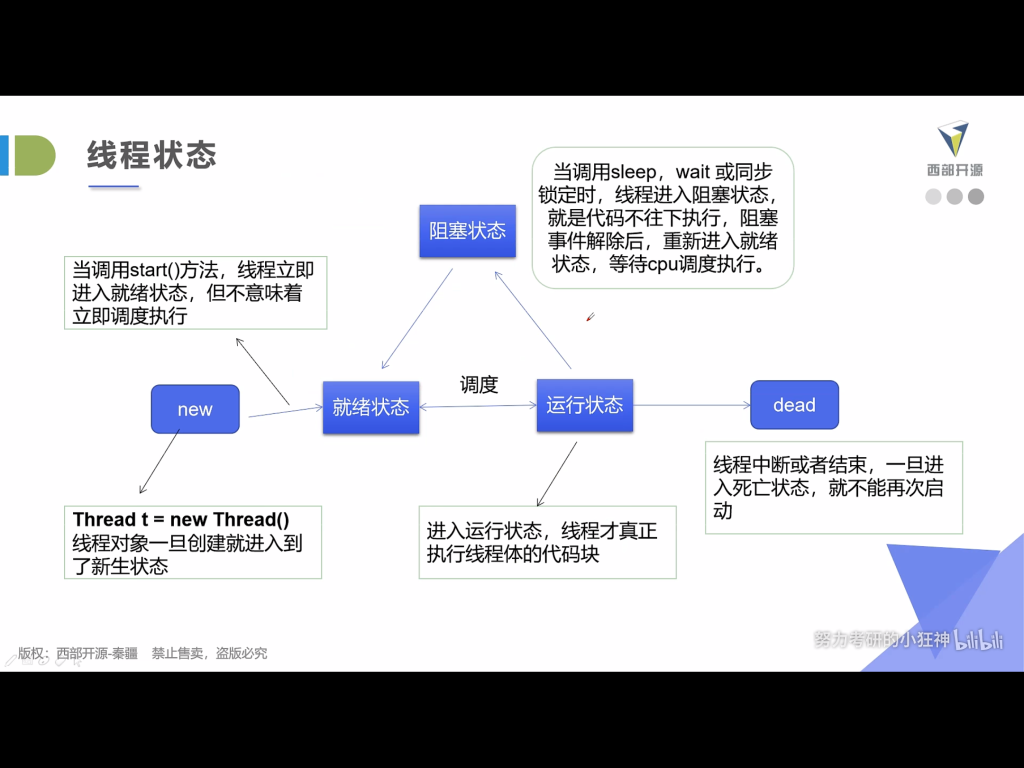
线程状态
Thread.currentThread()
使用Thread.currentThread()方法可以查看当前线程的相关信息
public class ThreadInformation {
    public static void main(String[] args) throws InterruptedException {
        MyThread myThread =new MyThread();

        Thread t1 = new Thread(myThread);
        Thread t2 = new Thread(myThread);
        Thread t3 = new Thread(myThread);
        Thread t4 = new Thread(myThread);

        t1.start();
        t2.start();
        t3.start();
        t4.start();

        for (int i = 0; i < 5; i++) {
            System.out.println(Thread.currentThread().getName());
            Thread.sleep(1000);
        }
        myThread.stop();
    }
}
class MyThread implements Runnable{

    //进程结束标记
    private boolean flag = true;

    @Override
    public void run() {
        for (int i = 0; i < 1000; i++) {
            if (flag)
                try {
                    System.out.println("进程名:"+Thread.currentThread().getName()+
                            " 进程状态:"+Thread.currentThread().getState()+
                            " 进程优先级:"+Thread.currentThread().getPriority());
                    Thread.sleep(1000);
                } catch (InterruptedException e) {
                    e.printStackTrace();
                }
        }
    }

    public void stop(){
        this.flag = false;
    }
}
线程停止
- 建议线程正常停止--->利用次数,不建议死循环
- 建议使用标志位--->设置一个flag
- 不要使用stop或者destroy等过时火JDK不建议使用的方法
public class StopThreadTest implements Runnable{

    private boolean flag = true;

    public void run(){
        int i = 0;
        while (flag){
            System.out.println("线程------>run------>"+i++);
        }
    }

    public void stop(){
        this.flag = false;
    }

    public static void main(String[] args) {
        StopThreadTest stopThreadTest =new StopThreadTest();
        new Thread(stopThreadTest).start();
        /*try {
            Thread.sleep(5000);
            stopThreadTest.stop();
        } catch (InterruptedException e) {
            e.printStackTrace();
        }*/

        for (int i = 0; i < 1000; i++) {
            System.out.println("mian--->"+i);
            if (i == 900){
                stopThreadTest.stop();
                System.out.println("线程停止");
            }
        }
    }
}
线程休眠
- sleep指定当前线程阻塞的毫秒数
- sleep存在异常InterruptedException
- sleep时间达到后线程进入就绪状态
- sleep可以模拟网络延时,倒计时等
- 每一对象都有一个锁,sleep不会释放锁
模拟网络延时
//模拟网络延时,放大问题的发生性
public class SleepTest implements Runnable{
    private int tiketNums = 10;

    public void run(){
        while (tiketNums>0){
            //模拟网络延时
            try {
                Thread.sleep(200);
            } catch (InterruptedException e) {
                e.printStackTrace();
            }
            System.out.println(Thread.currentThread().getName()+"---->拿到了第"+tiketNums--+"票");
        }
    }

    public static void main(String[] args) {
        SleepTest sleepTest = new SleepTest();
        new Thread(sleepTest,"小明").start();
        new Thread(sleepTest,"老师").start();
        new Thread(sleepTest,"黄牛").start();
    }
}
模拟倒计时
public class SleepTest2 implements Runnable{
    public void run() {
        for (int i = 0;i<10;i++){
            try {
                tenDown(i);
            } catch (InterruptedException e) {
                e.printStackTrace();
            }
        }
    }

    public void tenDown(int i) throws InterruptedException{
        Thread.sleep(1000);
        System.out.println(10-i);
    }

    public static void main(String[] args) {
        SleepTest2 sleepTest2 = new SleepTest2();
        new Thread(sleepTest2).start();
    }
}
线程礼让
- 礼让线程yield,让当前正在执行的线程暂停,但不阻塞
- 让线程从运行状态转为就绪状态
- 让cpu重新调度,礼让不一定成功,看cpu心情!
线程强制执行
- Join合并线程,待此线程执行完成后,再执行其他线程,其他线程阻塞
- 线程插队
public class JoinTest implements Runnable{
    @Override
    public void run() {
        for (int i = 0; i < 1000; i++) {
            System.out.println("vip线程--->"+i);
        }
    }

    public static void main(String[] args) throws InterruptedException {
        Thread thread = new Thread(new JoinTest());
        thread.start();
        for (int i = 0; i < 500; i++) {
            if(i == 200)
                thread.join();
            System.out.println("主线程----->"+i);
        }
    }
}
线程状态观测
- NEW 尚未启动的线程
- RUNNABLE 在java虚拟机中执行的线程
- BLOCKED 被阻塞等待监视器锁定的线程
- WAITING 正在等待另一个线程执行特定动作的线程
- TIMED WAITING 正在等待另一个线程执行动作达到指定等待时间的线程
- TERMINATED 已退出的线程
public class StateTest {
    public static void main(String[] args) throws InterruptedException {
        Thread thread = new Thread(()->{
            for (int i = 0; i < 20; i++) {
                try {
                    Thread.sleep(1000);
                    System.out.println("running");
                } catch (InterruptedException e) {
                    e.printStackTrace();
                }
            }
            System.out.println("--------------");
        });

        //观察状态
        Thread.State state = thread.getState();
        System.out.println(state);

        //观察启动后状态
        thread.start();
        state = thread.getState();
        System.out.println(state);

        while (state != Thread.State.TERMINATED){//只要线程不终止,就一直输出状态
            Thread.sleep(100);
            state = thread.getState();//更新线程状态
            System.out.println(state);
        }
    }
}
线程优先级
java提供一个线程调度器来监控程序中启动后进入就绪状态的所有线程,线程调度器按照优先级决定应该调度哪个线程来执行
线程的优先级用数字表示,范围1~10
- Thread.MIN_PRIORITY = 1
- Thread.MAX_PRIORITY= 10
- Thread.NORM_PRIORITY = 5
使用getPriority( )/setPriority(int xxx) 改变或获取优先级
public class PriorityTest {
    public static void main(String[] args) {

        System.out.println(Thread.currentThread().getName()+"--->"+Thread.currentThread().getPriority());

        MyPriority myPriority = new MyPriority();

        Thread t1 = new Thread(myPriority);
        Thread t2 = new Thread(myPriority);
        Thread t3 = new Thread(myPriority);
        Thread t4 = new Thread(myPriority);
        Thread t5 = new Thread(myPriority);

        t1.start();

        t2.setPriority(1);
        t2.start();

        t3.setPriority(9);
        t3.start();

        t4.setPriority(10);
        t4.start();

        t5.setPriority(4);
        t5.start();

    }
}
class MyPriority implements Runnable{
    @Override
    public void run() {
        System.out.println(Thread.currentThread().getName()+"----->"+Thread.currentThread().getPriority());
    }
}
守护(daemon)线程
- 线程分为用户线程和守护线程
- 虚拟机必需确保用户线程执行完毕
- 虚拟机不用等待守护线程执行完毕
public class DaemonTest {
    public static void main(String[] args) {
        God god = new God();
        You you = new You();

        Thread thread = new Thread(god);
        thread.setDaemon(true);

        Thread thread1 = new Thread(you);

        thread.start();
        thread1.start();

    }
}
class God implements Runnable{
    @Override
    public void run() {
        while (true){
            System.out.println("God bless you");
        }
    }
}
class You implements Runnable{
    @Override
    public void run() {
        for (int i = 0; i < 36500; i++) {
            System.out.println("You are happy");
        }
        System.out.println("Goodbye world");
    }
}
线程同步
线程同步是一种等待机制,多个需要同时访问此对象的线程进入这个对象的等待池形成队列,等待前面线程使用完毕,下一个线程再使用。为了保证数据在方法中被访问的正确性,在访问时加入锁机制(synchronized),当一个线程获得对象的排它锁,独占资源,其他线程必须等待,使用后释放锁即可,弊端:
- 一个线程持有锁会导致其他所有需要此锁的线程挂起
- 在多线程竞争下,加锁、释放锁会导致比较多的上下文切换和调度延时,引起性能问题
- 如果一个优先级高的线程等待一个优先级低的线程释放锁,会导致优先级倒置,引起性能问题
同步方法与同步块
同步方法
public synchronized void method(int args){}
synchronized方法控制对“对象”的访问,每个对象对应一把锁,每个synchronized方法都必须获得调用该方法的对象的锁才能执行,否则线程会阻塞,方法一旦执行,就独占该锁,直到该方法返回才释放锁,后面被阻塞的线程才能获得这个锁,继续执行
缺点:若将一个大的方法声明为synchronized将会影响效率
同步块
synchronized (Obj) {}
Obj称为同步监视器:
- Obj可以是任何对象,但是推荐使用共享资源作为同步监视器
- 同步方法中无需指定同步监视器,以为同步方法的同步监视器就是this,即这个对象本身
同步监视器的执行过程:
- 第一个线程访问,锁定同步监视器,执行其中代码
- 第二个线程访问,发现同步监视器被锁定,无法访问
- 第一个线程访问完毕,解锁同步监视器
- 第二个线程访问,发现同步监视器没有锁,然后锁定并访问
不安全案例(一) 购票
public class UnsafeBuyTicket {
    public static void main(String[] args) {
        BuyTicket station = new BuyTicket();

        new Thread(station,"小明").start();
        new Thread(station,"老师").start();
        new Thread(station,"黄牛").start();
    }
}
class BuyTicket implements Runnable{

    //票
    private int ticketNums = 10;
    private boolean flag = true;

    @Override
    public void run() {
        //买票
        while (flag){
            buy();
        }
    }

    private void buy(){
        if(ticketNums<=0){
            this.flag = false;
            return;
        }
        System.out.println(Thread.currentThread().getName()+"--->购买了第"+(10-(ticketNums--))+"张票");
    }
}
运行结果:
老师--->购买了第0张票
老师--->购买了第2张票
老师--->购买了第3张票
老师--->购买了第4张票
老师--->购买了第5张票
老师--->购买了第6张票
老师--->购买了第7张票
老师--->购买了第8张票
老师--->购买了第9张票
黄牛--->购买了第1张票
小明--->购买了第0张票
修改后的案例
public class UnsafeBuyTicket {
    public static void main(String[] args) {
        BuyTicket station = new BuyTicket();

        new Thread(station,"小明").start();
        new Thread(station,"老师").start();
        new Thread(station,"黄牛").start();
    }
}
class BuyTicket implements Runnable{

    //票
    private int ticketNums = 10;
    private boolean flag = true;

    @Override
    public void run() {
        //买票
        while (flag){
            try {
                buy();
                Thread.sleep(200);
            } catch (InterruptedException e) {
                e.printStackTrace();
            }
        }
    }

    private synchronized void buy(){
        if(ticketNums<=0){
            this.flag = false;
            return;
        }
        System.out.println(Thread.currentThread().getName()+"--->购买了第"+(11-(ticketNums--))+"张票");
    }
}
运行结果;
老师--->购买了第1张票
黄牛--->购买了第2张票
小明--->购买了第3张票
黄牛--->购买了第4张票
小明--->购买了第5张票
老师--->购买了第6张票
黄牛--->购买了第7张票
小明--->购买了第8张票
老师--->购买了第9张票
小明--->购买了第10张票
不安全案例(二) 银行
public class UnsafeBank {
    public static void main(String[] args) {
        Account account = new Account(100,"基金总额");
        Drawing boy = new Drawing(account,50,"boy");
        Drawing girl = new Drawing(account,100,"girl");

        boy.start();
        girl.start();
    }
}

//账户
class Account{
    int money;
    String name;

    public Account(int money, String name) {
        this.money = money;
        this.name = name;
    }
}

//银行:模拟取款
class Drawing extends Thread{
    Account account; //账户
    int drawingMoney;//取出金额
    int nowMoney;    //现金

    public Drawing(Account account,int drawingMoney,String name){
        super(name);
        this.account = account;
        this.drawingMoney = drawingMoney;
    }

    @Override
    public void run() {
        try {
            Thread.sleep(3000);
        } catch (InterruptedException e) {
            e.printStackTrace();
        }
        if(account.money-drawingMoney<0){
            System.out.println(Thread.currentThread().getName()+"--->余额不足");
            return;
        }
        account.money = account.money-this.drawingMoney;
        this.nowMoney = this.nowMoney+this.drawingMoney;
        System.out.println(this.getName()+"取了--->"+this.drawingMoney+"元,手中有--->"+this.nowMoney+"元现金,余额为:"+account.money+"元");
    }
}
运行结果:
girl取了--->100元,手中有--->100元现金,余额为:-50元
boy取了--->50元,手中有--->50元现金,余额为:-50元
修改后的案例
public class UnsafeBank {
    public static void main(String[] args) {
        Account account = new Account(1000,"基金总额");
        Drawing boy = new Drawing(account,50,"boy");
        Drawing girl = new Drawing(account,100,"girl");

        boy.start();
        girl.start();
    }
}

//账户
class Account{
    int money;
    String name;

    public Account(int money, String name) {
        this.money = money;
        this.name = name;
    }
}

//银行:模拟取款
class Drawing extends Thread{
    Account account; //账户
    int drawingMoney;//取出金额
    int nowMoney;    //现金

    public Drawing(Account account,int drawingMoney,String name){
        super(name);
        this.account = account;
        this.drawingMoney = drawingMoney;
    }

    @Override
    public void run() {

        synchronized (account){
            try {
                Thread.sleep(1000);
            } catch (InterruptedException e) {
                e.printStackTrace();
            }
            if(account.money-drawingMoney<0){
                System.out.println(Thread.currentThread().getName()+"--->余额不足");
                return;
            }
            account.money = account.money-this.drawingMoney;
            this.nowMoney = this.nowMoney+this.drawingMoney;
            System.out.println(this.getName()+"取了--->"+this.drawingMoney+"元,手中有--->"+this.nowMoney+"元现金,余额为:"+account.money+"元");
        }
    }
}
运行结果:
boy取了--->50元,手中有--->50元现金,余额为:950元
girl取了--->100元,手中有--->100元现金,余额为:850元
不安全案例(三) 集合
public class UnsafeList {
    public static void main(String[] args) {
        List<String> list = new ArrayList<>();
        for (int i = 0; i < 10000; i++) {
            new Thread(()->{
                list.add(Thread.currentThread().getName());
            }).start();
        }
        System.out.println(list.size());
    }
}
运行结果:
9996
修改后的案例
public class UnsafeList {
    public static void main(String[] args) throws InterruptedException {
        List<String> list = new ArrayList<>();
        for (int i = 0; i < 10000; i++) {
            new Thread(()->{
                synchronized (list){
                    list.add(Thread.currentThread().getName());
                }
            }).start();
        }
        Thread.sleep(200);
        System.out.println(list.size());
    }
}
运行结果:
10000死锁
多个线程各自占有一些共享资源,并且互相等待其他线程占有的资源才能运行,而导致两个或多个线程都在等待对方释放资源,都停止执行的情形。某一个同步块同时拥有“两个以上对象的锁”时,就可能会发生“死锁”的问题。
public class DeadLock {
    public static void main(String[] args) {
        Makeup test1 = new Makeup(0,"白雪公主");
        Makeup test2 = new Makeup(1,"灰姑娘");

        test1.start();
        test2.start();

    }
}

//口红
class Lipstick{ }

//镜子
class Mirror{ }

class Makeup extends Thread{

    static Lipstick lipstick = new Lipstick();
    static Mirror mirror =new Mirror();

    private int choice;
    private String girlName;

    public Makeup( int choice, String name) {
        this.choice = choice;
        this.girlName = name;
    }

    @Override
    public void run() {
        try {
            makeUp();
        } catch (InterruptedException e) {
            e.printStackTrace();
        }
    }

    public void makeUp() throws InterruptedException {
        if(choice == 0){
            synchronized (lipstick){
                System.out.println(this.girlName+"--->拿到了口红的锁");
                Thread.sleep(1000);
                synchronized (mirror){
                    System.out.println(this.girlName+"--->拿到了镜子的锁");
                }
            }//抢占了两个及以上的资源锁,造成的死锁
        }else {
            synchronized (mirror){
                System.out.println(this.girlName+"--->拿到了镜子的锁");
                Thread.sleep(1000);
                synchronized (lipstick){
                    System.out.println(this.girlName+"--->拿到了口红的锁");
                }
            }
        }
    }
}
死锁避免方法
死锁的必要条件:
- 互斥条件:每个资源每次只能被一个进程使用
- 请求与保持条件:一个进程因请求资源而阻塞时,对已获得的资源保持不放
- 不剥夺条件:进程已获得的资源,在未使用完之前,不能强行剥夺
- 循环等待条件:若干进程之间形成一种头尾相接的循环等待资源关系
Lock
synchronized与Lock的对比
- Lock是显式锁(手动开启和关闭锁),synchronized是隐式锁,出了作用域自动释放
- Lock只有代码块锁,synchronized有代码块锁和方法锁
- 使用Lock锁,JVM将花费较少的时间来调度线程,性能更好。并且具有更好的扩展性
- 优先使用顺序 Lock>同步代码块(已经进入了方法体,分配了相应资源)>同步方法
public class LockTest {
    public static void main(String[] args) {

        BuyTickets buyTicket = new BuyTickets();

        new Thread(buyTicket,"学生").start();
        new Thread(buyTicket,"老师").start();
        new Thread(buyTicket,"黄牛").start();

    }
}

class BuyTickets implements Runnable{

    private int ticketNums = 10;

    //定义luck锁
    private final ReentrantLock lock = new ReentrantLock();

    @Override
    public void run() {
        while (true){
            try {
                lock.lock();//加锁
                if(ticketNums>0){
                    System.out.println(Thread.currentThread().getName()+"--->"+ticketNums--);
                }else return;
            } finally {
                lock.unlock();
            }
            try {
                Thread.sleep(1000);
            } catch (InterruptedException e) {
                e.printStackTrace();
            }
        }
    }
}
线程协作
- wait( ) 表示线程一直等待,直到其他线程通知,与sleep不同,会释放锁
- wait(long timeout) 指定等待的毫秒数
- notify( ) 唤醒一个处于等待状态的线程
- notifyAll( ) 欢迎同一个对象上所有调用wait( )方法的线程,优先级别高的线程优先调度
Comments NOTHING